


Sign In / Sign Up To Add Wishlist
Wishlist is available for members only. Please sign in or sign up to add your wishlist.
What Security Features Should You Look for in an Office Printer?

Ever had to make a mad dash to the printer because a confidential document started printing before you could get there to collect it? Secure Print helps prevent documents from being left unattended by holding the print job until you’re at the device and ready to release it.
Contracts, financial reports, customer records, employee information and internal plans can all become exposed during an ordinary print job. A document may travel across a network, wait in a queue, remain temporarily stored on a device and sit in the output tray before it reaches the right person.
Choosing the right printer means considering your office’s needs for paper handling, scanning, print quality and user access - not simply looking for a feature called “Secure Print”. It should also help protect information throughout the entire document workflow.
But the right printer won't look the same for every business. A small team may need straightforward controls on one shared device, while a large organisation may need consistent authentication and management across an entire fleet. For workplaces where monitoring devices, coordinating supplies, maintaining service levels and applying consistent print policies are becoming difficult to manage internally, Managed Print Services (MPS) may also form part of the solution.
We’ll explain the security features first, show where MPS fits, then bring the Brother printer recommendations together in one clear section for small, medium and large businesses.
What should secure printing protect?
Secure printing should protect a document throughout its journey - not only during the few seconds when paper comes out of the machine.
That journey begins when someone selects “Print” and continues while the job travels across the network, waits in a queue, reaches the device and is collected or disposed of. Without the appropriate controls at each stage, confidential information could still end up in the wrong hands.
What does secure printing mean?
Secure printing isn’t one feature. It’s a combination of controls that protects information before, during and after a job is printed.
Three related terms are worth separating:
- A secure printer is a device with safeguards at the document, device and network levels. These may include user authentication, encrypted communication, administrator controls and firmware security.
- Secure print release holds a job until an authorised user enters a PIN, taps an access card or signs in at the device
- Printer security covers the wider environment around the machine, including network configuration, firmware updates, user permissions, print logs, physical access and document disposal.
Secure release can address one of the most visible risks - confidential pages waiting unattended in the output tray. However, it can’t protect a printer that still uses a default administrator password, communicates over unsecured protocols or hasn’t received a firmware update since it first arrived in the office.
It's also important to note the level of protection you need depends on what your business prints and how people use the device. A small office with one printer nearby may be able to rely on PIN release and strong administrator controls. The Brother MFC-J5110DW, for example, uses Secure Print to hold confidential jobs until they’re released at the machine. That can help stop sensitive documents from starting their own unsupervised networking session in the output tray.
But a growing business with a device shared across several teams may benefit more from card authentication, directory sign-in and a more coordinated service arrangement and across a larger fleet, centralised management, reporting and consistent security policies become much more important - making Managed Print Services (MPS) worth considering as part of the wider print strategy.
In other words, start with the workflow rather than the model number. It's easier to choose the right printer once you know where documents could be exposed and which controls would close those gaps.
For a broader look at the vulnerabilities that can affect connected devices, including firmware and network risks, see How secure is your business printer?
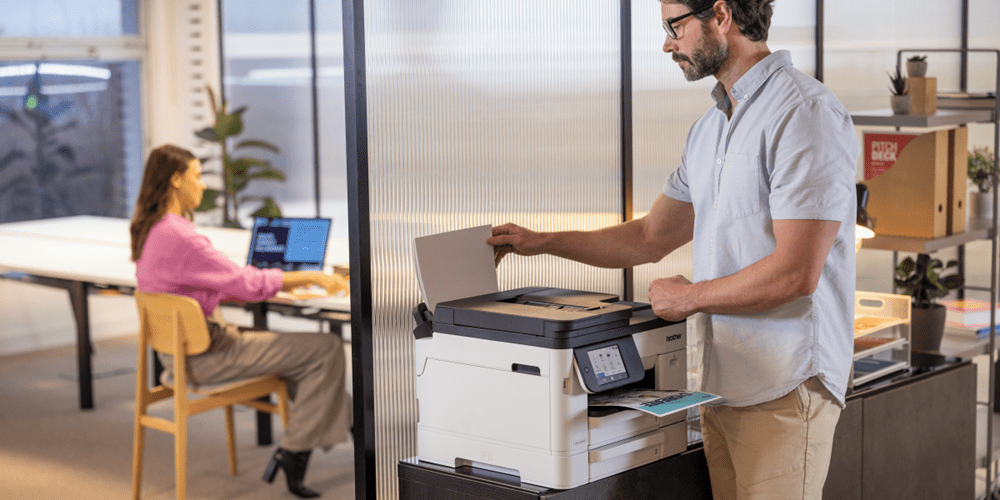
Which printer security features matter most?
Start with the everyday risks identified in your workflow rather than working backwards from the longest spec sheet you can find. A feature’s only useful when it addresses a real requirement and your team can use it consistently.
The buyer’s checklist below groups the main criteria into four areas.
- Access control: Look for PIN release, NFC or badge authentication, directory sign-in, role-based access, control-panel locking and any two-factor authentication options required by your organisation.
- Data protection: Check for encrypted network protocols, firmware validation, Secure Boot where available, automatic job deletion and appropriate protection for information stored by the device
- Device management: Consider central configuration, remote firmware deployment, audit logs, usage reporting, security alerts and integration with print management software. If these tasks are difficult to manage consistently in-house, ask whether an MPS arrangement could provide the required monitoring, service and reporting support.
- Workflow and paper handling: Confirm the print, scan, copy and fax functions your team needs, along with suitable paper sizes, tray capacity, automatic 2-sided (duplex) printing, ADF capability and multiple paper sources where required.
The last category may sound more practical than technical, but it matters. A secure job that can’t be printed or scanned correctly is likely to create workarounds - and workarounds have a habit of being less secure than the process they replaced.
Security built into Brother business printing
Brother takes a multi-layered approach to print security, with safeguards designed to help protect devices, networks and documents throughout the print workflow. Brother’s security certification provides additional independent recognition of this approach, alongside the practical security features available across supported Brother business devices.
Certification applies to eligible Brother products and solutions. Please refer to individual product specifications for available security features and certification details.
How do Access Control and Secure Release work?
Access Control determines who can use the printer, which functions they can access and how they prove their identity.
PIN release is a practical starting point. The user creates a PIN when sending a document and enters it at the printer before the pages are produced. This can reduce the chance of sensitive documents being left unattended, although PINs still need to be protected and shouldn’t become one shared office code stuck to the wall beside the machine.
NFC or badge authentication can make secure release more convenient in a busy workplace. A user taps an authorised card at the printer, helping connect access and activity to an individual account. The Brother MFC-J5115DW supports NFC card release and directory sign-in, making it a stronger fit for managed or multi-department environments.
The Brother MFC-L8970CDW also supports NFC card authentication for controlled access, alongside device, network and document-level security. Its colour output and fast 2-sided (duplex) scanning may suit a shared team processing a mixture of client documents, correspondence and internal records.

How can Managed Print Services support secure printing?
Printer purchases tend to happen at specific moments of need. Managing a print environment is an ongoing one. Managed Print Services can help businesses assess their print requirements, deploy suitable devices and coordinate supplies, maintenance, reporting and support through an agreed service arrangement.
From a security perspective, the value is less about one individual feature and more about ensuring protections are applied consistently across the printer and its workflows. An MPS solution helps a business gain visibility across its devices, standardise supported models, coordinate approved print-management integrations and reduce the likelihood of individual printers becoming forgotten corners of the network.
MPS may be worth considering when:
- several teams, floors or locations use different printers and settings
- internal teams have limited visibility into device use, status or service requirements
- the business needs a more consistent approach to user access and secure release
- supplies ordering and printer downtime regularly interrupt staff
- reporting, support expectations and total cost of ownership need to be easier to understand
- the organisation expects its print environment to grow or change over time
The right arrangement depends on the workplace. Before proceeding, confirm the devices and services included, contract terms, support coverage, reporting available, security responsibilities and whether any print-management software or licences are separate.
Which secure printer suits your business size?
Business size is a useful starting point, but also consider print volume, the number of users sharing each device, document sensitivity and whether you need colour, scanning or centralised management.
| Business size | Brother printer recommendation | Why it may fit |
| Small business | Brother MFC-J5110DW | A colour multi-function option for a smaller team using one shared printer. Secure Print can hold confidential jobs at the device, while dual 250-sheet trays and a 100-sheet multi-purpose tray provide flexible paper handling. |
| Medium business | Brother MFC-J5115DW or Brother MFC-L8930CDW | Consider the MFC-J5115DW when managed A4 colour inkjet printing, NFC authentication and multiple paper sources are priorities. Consider the MFC-L8930CDW when a shared workgroup needs colour laser output, NFC authentication and faster 2-sided (duplex) scanning. MPS may help coordinate devices, supplies, reporting and support as the print environment grows. |
| Large business | Brother MFC-L6915DW, Brother HL-L6415DW or Brother MFC-L8970CDW | Choose based on the department’s role: the MFC-L6915DW for high-volume mono multifunction workflows, the HL-L6415DW for high-volume mono print-only areas or the MPS-exclusive MFC-L8970CDW for managed colour multi-function requirements. An MPS approach can help apply a coordinated device, service and reporting strategy across the wider fleet. |
Ultimately, the right secure printer should protect sensitive information without turning an everyday task into an obstacle course. Start by mapping where documents could be exposed, then match those risks to practical controls such as secure release, authentication, encrypted communication, firmware support, audit visibility and appropriate paper handling.
You can explore Brother’s full range of printers and multi-function printers or speak with Brother about whether Managed Print Services could suit your organisation. The best solution is the one that matches your business size and workflow while keeping confidential documents controlled - without making staff think about security every time they press Print.
Got any more questions? Feel free to contact us. Our team can help you compare individual printers or consider a broader secure print setup for your organisation.
Comments

Best Office Printers
Compare the best office printers from Brother for small teams, busy workgroups and corporate fleets, and learn when Managed Print Services may be a better fit than relying on one device.

What's the Best Printer for Small Business?
Find the best printer for small business. Compare inkjet, laser and A3 printers based on your team, workload and office needs.

How to Choose the Best Colour Laser Printer
Find the best colour laser printer for your business. Compare compact printers, multi-function models, toner costs and Brother recommendations.

Resource Library
Explore our range of eBooks, Whitepapers & Case studies
Be the first to receive ongoing exclusive offers and the latest news on our products and services directly in your inbox!