


.jpg?rev=951c0bca3dec422a8ad13aa442ffcfb5&hash=0FBF74C62A92310FAF8F4DC69FF23732)
.jpg?rev=456bfd51d1324ba4aa2794434632d7b5&hash=A1025E70D398D2F718494E6196E9AA40)
Versatile Magnetic Frame Medium (Frame only) for PR Series
Boost productivity with Brother’s easy-to-use Magnetic Frame Kit. No more fiddling with catches and levers, just hoop any material up to 2mm thick and go! Requires Arm F which is not included with this item. If you require Arm F please purchase the Magnetic Frame Kit PRVMFMKIT which includes both the frame and Arm F.
- 100 x 100 mm (4 x 4") embroidery area.
- Embroider materials up to 2mm thick.
- Reduces scratching and hoop burn damage to your hooped materials.
- Stitch on the mid and bottom parts of tote bags.
- Scale marks every 10 mm for easy position reference.
Information


Overview

Embroidery area
100mm x 100mm (4” x 4”)
Suitable for a variety of applications.

Attaching the frame
Brother PR embroidery frames require to be attached to the PR machine with a specific Arm or Driver. The required Arm F (not pictured) is not included in this kit.

Machine compatibility
This PRVMFMAP frame can be used with: PR1060W,PR680W, PR1X, PR1055X,PR1050X, PR670E.

Hoop in seconds, not minutes.
Perfect for beginners! No catches, no levers, just place the magnets and embroider.

Increase productivity and reduce downtime
This frame can be used without removing the base embroidery frame from the machine.

Handle challenging items with confidence.
Use this frame for items that are difficult to hoop, such as tubular items like pre-made bags, shirts,and embroidery blanks. Magnetic frames can also help prevent hoop burn on delicate fabrics, such as velvet.
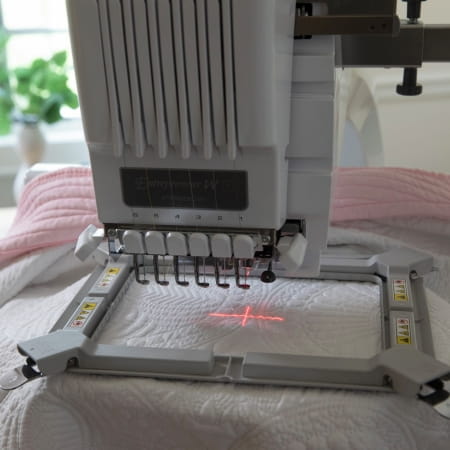
Why go magnetic?
Magnetic embroidery frames for Brother multi-needle machines provide faster, safer, and more precise hooping, ensuring even pressure across fabrics. They are designed for use with item thicknesses up to 2mm.
Explore the other Magnetic hoops available for Brother Multineedle machines
PRVMFMKITAP Magnetic Frame Kit 100mm x 100mm
PRVMFLAP Magnetic Frame 130mm x 180mm
PRVMFLKITAP Magnetic Frame Kit 130mm x 180mm
How to use the PRVMFMKITAP Magnetic Frame (Medium)
Attach the accessory according to the product instruction manual, ensuring it is securely fitted before use. Once installed, adjust and position your project as required, then operate the machine as normal. Refer to the user guide for accessory-specific setup and recommended applications.
Efficient workflows
Preparing sets of napkins is a great example of how efficient workflows save you time. Marking the placement on all pieces in one go and use a magnetic frame so you can leave the frame attached when you change out each napkin. Once you find a rhythm, you’ll move through large quantities with ease.
Specifications
Show More
Show Less
Reviews
Suitable with
Recently viewed products
Sign In / Sign Up To Add Wishlist
Wishlist is available for members only. Please sign in or sign up to add your wishlist.